


Yes, it is a solid choice for programming and development. The Intel Core i5-13420H (8 cores / 12 threads) combined with 16GB RAM ensures smooth performance in IDEs like VS Code, IntelliJ IDEA, and Android Studio. It handles multitasking, compiling code, running local servers, and moderate virtual machine usage reliably.
We independently review everything we recommend. When you buy through our links, we may earn a commission. How we evaluate
ASUS Vivobook 16 Review 2026: Worth Buying?

Last updated 26th February 2026
9 min read
Table of Contents
In a market flooded with overpriced ultrabooks, the ASUS Vivobook 16 aims to be a reliable, large-screen workhorse that doesn’t break the bank.
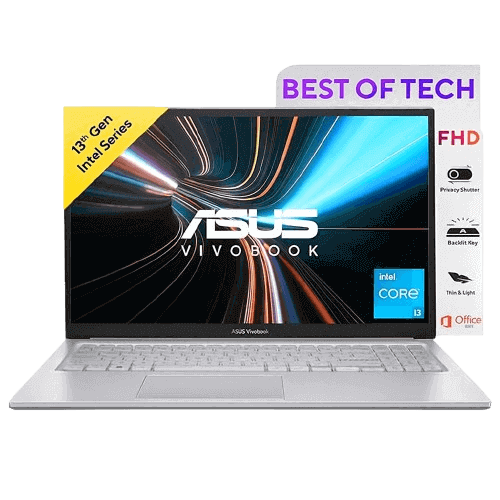
Powered by the Intel Core i5-13420H, this productivity-focused 16-inch laptop targets students, professionals, developers, and home users who need strong everyday performance without the price tag of a dedicated gaming rig. It features a spacious 16:10 WUXGA display, 16GB RAM, and fast PCIe 4.0 SSD storage, positioning it competitively in the mid-range segment.
Designed for multitasking, long work sessions, document editing, coding, browsing, and office productivity, the Vivobook 16 prioritizes CPU performance and screen comfort over gaming capabilities. Practical design elements like the 180° lay-flat hinge and a physical webcam privacy shield add functional value for daily use.
However, with its H-series processor and large display, an important question remains: does performance come at the cost of battery efficiency? Let’s take a closer look.
4.1
4.1
4.1
4.1
₹58,500₹58,500
Prices may vary by location and availability, so check the latest price before buying to avoid any surprises.
Pros
- Large 16-inch WUXGA 16:10 display
- Powerful Intel Core i5 H-series processor
- 16GB RAM for smooth multitasking
- Fast PCIe 4.0 NVMe SSD
- Backlit keyboard with number pad
- Lifetime Microsoft Office included
Cons
- Integrated graphics only
- Average 42Wh battery capacity
- Not suitable for gaming or heavy 3D work
Specifications
Who Should Buy This Laptop
Good Choice For:
- Students who need a large display for study and projects
- Office users who work with spreadsheets and presentations
- Developers and programmers who need strong CPU performance
- Business users who want pre-installed Microsoft Office
- Users looking for a 16-inch productivity laptop under ₹60,000
Not Ideal For:
- Gamers who need dedicated GPU performance
- Professional video editors working on heavy 4K projects
- Users who prioritize ultra-long battery life
- Creators requiring high-end graphics acceleration
If you're exploring more choices in this price range, it’s worth taking a look at other strong contenders that offer solid performance and value under a similar budget.
Best Laptops Under ₹50,000 for Work and Study 2026
Performance and Processor
The Intel Core i5-13420H is an 8-core, 12-thread H-series processor with a boost clock up to 4.6 GHz and 12MB cache. It uses a hybrid design with Performance and Efficient cores to balance speed and power efficiency. Compared to U-series processors, this H-series chip delivers stronger multitasking and better performance in CPU-heavy workloads like coding, compiling, and data processing.
The laptop handles multiple browser tabs, Microsoft Office apps, coding tools, and light photo editing smoothly. System performance remains responsive under moderate workloads, making it suitable for students and professionals. It can also manage light 1080p video editing and development tasks comfortably, though it is not intended for heavy rendering or GPU-intensive work.
If you want a clearer understanding of how AMD and Intel laptop processors compare in everyday performance, this detailed guide breaks it down in practical terms.
Intel vs AMD: How to Choose the Right Laptop Processor
Graphics Performance
The integrated graphics handle YouTube 4K streaming, OTT platforms, and high-resolution video playback smoothly without frame drops. It also performs well for Canva, basic Photoshop edits, PowerPoint animations, and simple design work.
The laptop uses integrated Intel UHD Graphics. This GPU is suitable for:
- Video streaming and 4K playback
- Presentations and office tasks
- Basic photo editing
- Light creative applications
- Casual games (like Roblox, Minecraft, or League of Legends) will run at 1080p on low-to-medium settings, but modern AAA titles (like Cyberpunk 2077 or Call of Duty) are not playable
For students and office users, tasks like working with charts in Excel, running web-based tools, attending online meetings, and using browser-based creative platforms work without graphical lag. It is not designed for modern gaming or heavy 3D rendering. Casual lightweight games may run at lower settings, but gaming is not its primary focus.
Screen and Visual Experience
The 16-inch WUXGA (1920 × 1200) display is one of the strongest highlights of this laptop. The 16:10 aspect ratio provides additional vertical screen space, which noticeably improves productivity when reading documents, coding, browsing long websites, or working on spreadsheets with less scrolling.
With around 300 nits of brightness and an anti-glare coating, the panel performs well indoors and remains comfortable during extended work sessions. For study, office tasks, and content streaming, the display feels easy on the eyes. Text appears sharp and clear, while colors look balanced for everyday professional use.
However, it’s important to note that this panel typically offers 45% NTSC color coverage, which is suitable for general productivity and media consumption but not ideal for professional color grading, advanced photo editing, or high-end creative workflows.
Design and Build
The laptop features a clean silver finish with a minimal, professional aesthetic that fits naturally in office, college, or home environments. The design avoids flashy elements, making it appropriate for both students and working professionals.
At 1.88 kg, it is reasonably portable for a 16-inch device. While not ultra-light, it remains manageable for daily commuting in a backpack. The chassis feels sturdy for regular use, with minimal flex on the keyboard deck. The hinge mechanism is firm and stable, supporting a 180° lay-flat design. However, due to the hinge tension and lightweight base, it typically requires two hands to open without the base lifting slightly.
The backlit keyboard features a full-size layout with a dedicated numeric keypad, which is especially practical for data entry, accounting tasks, and spreadsheet-heavy workflows. Key travel feels comfortable during extended typing sessions, making long hours of work more natural and less fatiguing.
Memory and Storage
This model comes with 16GB DDR4 RAM, configured as 8GB soldered on the motherboard and 8GB in a user-accessible SO-DIMM slot. While 16GB is already sufficient for multitasking, coding, virtual machines, and heavy browser usage, power users will appreciate that the memory is expandable up to 24GB by replacing the 8GB module with a 16GB stick. This provides useful headroom for future workloads.
The 512GB PCIe 4.0 NVMe SSD delivers fast boot times, quick application launches, and smooth file transfers. Storage performance aligns with what you would expect from a modern mid-range laptop, ensuring responsive everyday operation.
Battery Life
The ASUS Vivobook 16 houses a 42Wh 3-cell Li-ion battery. In everyday productivity tasks such as browsing, document editing, streaming, and online classes, it delivers approximately 5 to 6 hours of battery life.
For a 16-inch laptop powered by an H-series processor, this is acceptable but not exceptional and remains one of the weaker aspects of the device. Under heavier workloads—such as extended coding sessions, video calls, or continuous media playback—battery life can drop to around 3 to 4 hours.
Charging performance is solid for this segment. The included 65W adapter supports fast charging, reaching roughly 60% in about 49 minutes, while a full charge typically takes around 2 hours and 45 minutes. For office or classroom environments, short charging breaks can quickly restore usable power, but carrying the charger is advisable for long days away from a socket.
Connectivity and Ports
The laptop supports Wi-Fi 6E and Bluetooth 5.3, providing fast, low-latency wireless connectivity for online meetings, cloud workflows, and large file downloads. In practical use, network stability remains consistent even during extended video calls and high-bandwidth tasks.
The port selection is well-balanced for productivity-focused users:
- 1× USB 3.2 Gen 1 Type-C (supports Power Delivery for charging)
- 2× USB 3.2 Gen 1 Type-A (high-speed data transfer)
- 1× USB 2.0 Type-A (ideal for mouse or keyboard peripherals)
- 1× HDMI 1.4 (external monitors or projectors)
- 1× 3.5mm Combo Audio Jack
The HDMI 1.4 port allows easy connection to external displays for presentations or dual-screen setups. However, it is limited to 4K at 30Hz (or 1080p at 60Hz and above), which is sufficient for office work and media playback but not ideal for high-refresh-rate 4K workflows.
The inclusion of USB-C Power Delivery is a notable advantage, enabling charging through compatible Type-C adapters or power banks. This adds flexibility for travel and reduces dependency on the bundled charger in certain situations.
Final Verdict
The ASUS Vivobook 16 with Intel Core i5-13420H stands out as a well-balanced productivity laptop in 2026. It offers strong CPU performance, a spacious 16:10 WUXGA display, 16GB RAM (expandable up to 24GB), and fast PCIe 4.0 SSD storage, further enhanced by bundled Microsoft Office software.
While it is not designed for gaming and its 42Wh battery delivers only average endurance, it performs reliably in everyday computing, coding, multitasking, and office-focused workloads. Battery life is sufficient for moderate use, but carrying the 65W charger is advisable for extended sessions.
If your priority is a large, comfortable workspace with dependable multitasking performance rather than portable gaming power or all-day battery life, the Vivobook 16 remains a strong value-for-money choice in the mid-range segment.
Frequently Asked Questions
The included 16GB DDR4 RAM is sufficient for most users in 2026, supporting heavy multitasking, multiple browser tabs, coding tools, Microsoft Office apps, and light creative work without slowdowns. Importantly, the memory is expandable up to 24GB via a single SO-DIMM slot, offering some future-proofing.
It can manage light 1080p video editing, basic Photoshop work, Canva projects, and simple graphic design tasks. However, with integrated Intel UHD Graphics and 45% NTSC color coverage, it is not ideal for 4K editing, advanced color grading, or professional 3D rendering. For academic projects and entry-level content creation, it performs adequately.
Given its 16-inch 16:10 WUXGA display, Intel Core i5 H-series processor, 16GB RAM (expandable), and 512GB PCIe 4.0 SSD, it offers strong value in the under ₹60,000 segment. It is especially suitable for students, office users, and professionals who prioritize productivity and screen space over gaming performance.
The 42Wh battery delivers around 5 to 6 hours of real-world usage during browsing, document editing, online classes, and streaming. Heavier workloads may reduce it to 3–4 hours. It is not built for all-day unplugged use, but it is adequate for classroom sessions and office work when a charger is accessible.
Published 10th January 2026
About the Author

Sahed Badsha | Tech Journalist
Hi, I’m Sahed a professional blogger and content strategist focused on technology, products, and digital innovation. I specialize in writing clear, research-backed articles that simplify complex topics for everyday readers. Over the years, I’ve worked on blogs, product reviews that help readers make smarter digital choices while staying informed about emerging product trends.
Related Reviews

HP 15 Laptop i3-1315U Review: Affordable 13th Gen Intel Core Laptop for Daily Use
8 Jan 2026
Read more
Dell Inspiron 3520 Review: Performance & Battery Test
28 Oct 2025
Read more
HP Victus 15 Review: Budget Gaming Ryzen 5 Laptop
27 Oct 2025
Read more
ASUS TUF A15 Review: Ryzen 7 7445HS & RTX 3050 Gaming Laptop
26 Oct 2025
Read more