

Yes, it handles video calls, documents, and multitasking smoothly.
We independently review everything we recommend. When you buy through our links, we may earn a commission. How we evaluate
HP 15 Laptop i3-1315U Review: Affordable 13th Gen Intel Core Laptop for Daily Use
Last updated 8th January 2026
7 min read
Table of Contents
Choosing a laptop today is less about flashy features and more about long-term comfort, stability, and performance you can trust. The HP 15 laptop powered by the 13th Gen Intel Core i3-1315U is built with this exact mindset. It is designed for people who want a smooth daily experience without complexity, whether that is for studies, office work, or home use.
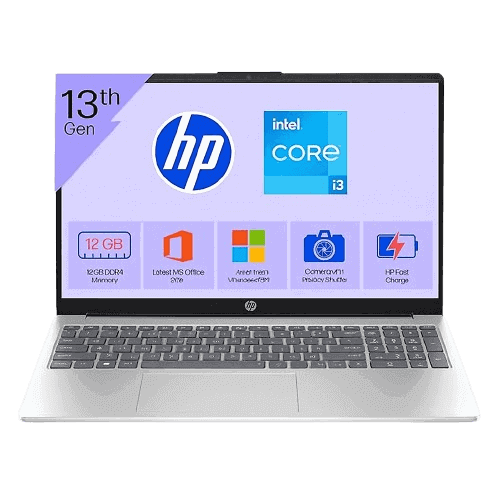
The HP 15 Laptop with 13th Gen Intel Core i3-1315U comes in a Natural Silver finish that looks clean and professional. It does not try to stand out aggressively, which actually works in its favor. This laptop fits well in classrooms, offices, and home desks alike.
Despite having a large 15.6-inch display, the laptop feels surprisingly light at just 1.59 kg. Carrying it in a backpack for daily travel does not feel tiring. The slim profile and balanced weight distribution make it easy to handle.
Build quality feels solid for everyday use. The hinge is stable, the lid does not flex easily, and the keyboard area feels firm while typing.
Before moving ahead, it can be useful to look at a few related guides that compare budget laptops and explain how processor choices affect everyday performance.
Best Laptops Under ₹50,000 for Work and Study 2026
Intel vs AMD: How to Choose the Right Laptop Processor
Performance in daily use
At the heart of this laptop is the Intel Core i3-1315U processor from Intel’s 13th Generation lineup. It features 6 cores and 8 threads with a maximum turbo speed of up to 4.5 GHz. This newer generation processor brings noticeable improvements in efficiency and responsiveness compared to older Core i3 models.
In real usage, the laptop performs smoothly for tasks like document editing, online research, video streaming, and office applications. Switching between apps feels quick, and the system does not struggle with everyday multitasking.
The presence of 12 GB DDR4 RAM plays a major role here. Having more than the usual 8 GB allows the laptop to handle multiple browser tabs, Excel files, and background apps without slowing down.
Storage speed and system responsiveness
The 512 GB PCIe Gen4 NVMe SSD gives the laptop a fast and responsive feel. Windows 11 boots quickly, applications open without delay, and file transfers are smooth.
For students and professionals, this storage capacity is more than sufficient for documents, presentations, photos, and software. It also helps the laptop stay responsive over long-term usage.
Display experience for work and entertainment
The 15.6-inch Full HD display offers a resolution of 1920 x 1080 pixels, which is ideal for productivity and media consumption. Text looks sharp, and videos appear clear.
The anti-glare coating reduces reflections, making it comfortable to use for long hours, especially during online classes or office work. With 250 nits brightness, the screen performs well indoors and under standard lighting conditions.
Color coverage is 45 percent NTSC, which is acceptable for general use. While it is not meant for professional color editing, it works well for watching videos, creating presentations, and everyday viewing.
Graphics and visual performance
Intel UHD Graphics handles all visual tasks efficiently. Watching high-definition videos, attending video calls, and working on presentations feels smooth. Light photo editing and basic design work are also manageable.
This laptop is not built for gaming or heavy graphic workloads, but it meets the needs of its target audience perfectly.
Keyboard, touchpad, and webcam experience
Typing on the HP 15 feels comfortable thanks to its full-size keyboard and numeric keypad. This is especially useful for students and professionals who work with numbers and spreadsheets.
Key spacing is good, and the typing experience remains comfortable even during long writing sessions. The touchpad is responsive and supports standard Windows gestures.
The webcam is suitable for online meetings and classes. It provides clear video quality in well-lit environments, making it reliable for daily video calls.
Ports and connectivity options
HP has provided a practical selection of ports that cover most everyday needs.
The laptop includes one USB Type-C port for data transfer, two USB Type-A ports, one HDMI 1.4b port, a headphone and microphone combo jack, and an AC smart pin for charging.
Wireless connectivity is handled by Wi-Fi 6 and Bluetooth 5.3. Internet connections remain stable, and wireless accessories like headphones and keyboards connect easily.
Battery performance in real life
The 41 Wh lithium-ion battery delivers a balanced performance. During mixed usage that includes browsing, document work, and video playback, the laptop lasts around 7 to 7.5 hours on a single charge.
This battery life is enough for a typical workday or a full day of classes with moderate usage. Charging is straightforward using the included power adapter.
Software and operating system experience
The HP 15 comes with Windows 11 Home Single Language, offering a modern and user-friendly interface. The system runs smoothly, and updates install without issues.
A major advantage is the inclusion of MS Office Home 2024 along with one year of Microsoft 365 Basic. This makes the laptop ready for work or study right out of the box, saving additional software costs.
Price and overall value
Considering its latest processor, generous RAM, fast SSD, and included MS Office, the HP 15 offers strong value in its price segment. It is designed to last for years of everyday use without feeling outdated quickly.
Pros
- Smooth everyday performance
- 12 GB RAM improves multitasking
- Fast SSD storage
- Lightweight and easy to carry
- Office software included
Cons
- Not designed for high-end gaming
- Average color accuracy
- USB Type-C port is data-only
Technical specifications
Why this laptop makes sense
This laptop focuses on what truly matters. It delivers reliable performance, good battery life, and a comfortable user experience. The lightweight design makes it easy to carry, and the modern processor ensures smooth operation over time. It also strikes a good balance between price and features, making it suitable for long study sessions, regular office workloads, and everyday home use without feeling underpowered or complicated.
Real-world usage scenarios
Students can use it for online classes, assignments, research, and presentations. Office professionals can rely on it for emails, spreadsheets, meetings, and reports. Home users will find it suitable for browsing, streaming, and personal tasks.
Who should consider buying it
This laptop is ideal for students, working professionals, home users, and small business owners who need a dependable daily-use machine. It is not meant for gaming or heavy creative work, but it excels at everyday computing.
Final thoughts
The HP 15 with Intel Core i3-1315U is a practical laptop that delivers exactly what most users need. It avoids unnecessary features and focuses on performance, comfort, and reliability. Day-to-day tasks feel smooth, startup times are quick, and the overall experience remains consistent over long usage. For students, professionals, and home users, it stands as a solid and sensible choice.
Sources
Frequently Asked Questions
It can run standard office and productivity software but is not meant for heavy editing or gaming tools.
Yes, it includes MS Office Home 2024 and one year of Microsoft 365 Basic.
Despite its large screen, it is lightweight and easy to carry.
Yes, the latest processor and fast storage make it suitable for long-term daily use.
Published 8th January 2026
About the Author

Sahed Badsha | Tech Journalist
Hi, I’m Sahed a professional blogger and content strategist focused on technology, products, and digital innovation. I specialize in writing clear, research-backed articles that simplify complex topics for everyday readers. Over the years, I’ve worked on blogs, product reviews that help readers make smarter digital choices while staying informed about emerging product trends.